AI SDR

A better conversation.
A clearer next step.

An AI caller that knows what to ask—and what should happen next. Built around your business, from the first enquiry to the human handoff.

Powered by ElevenLabs. Engineered by RECAST.
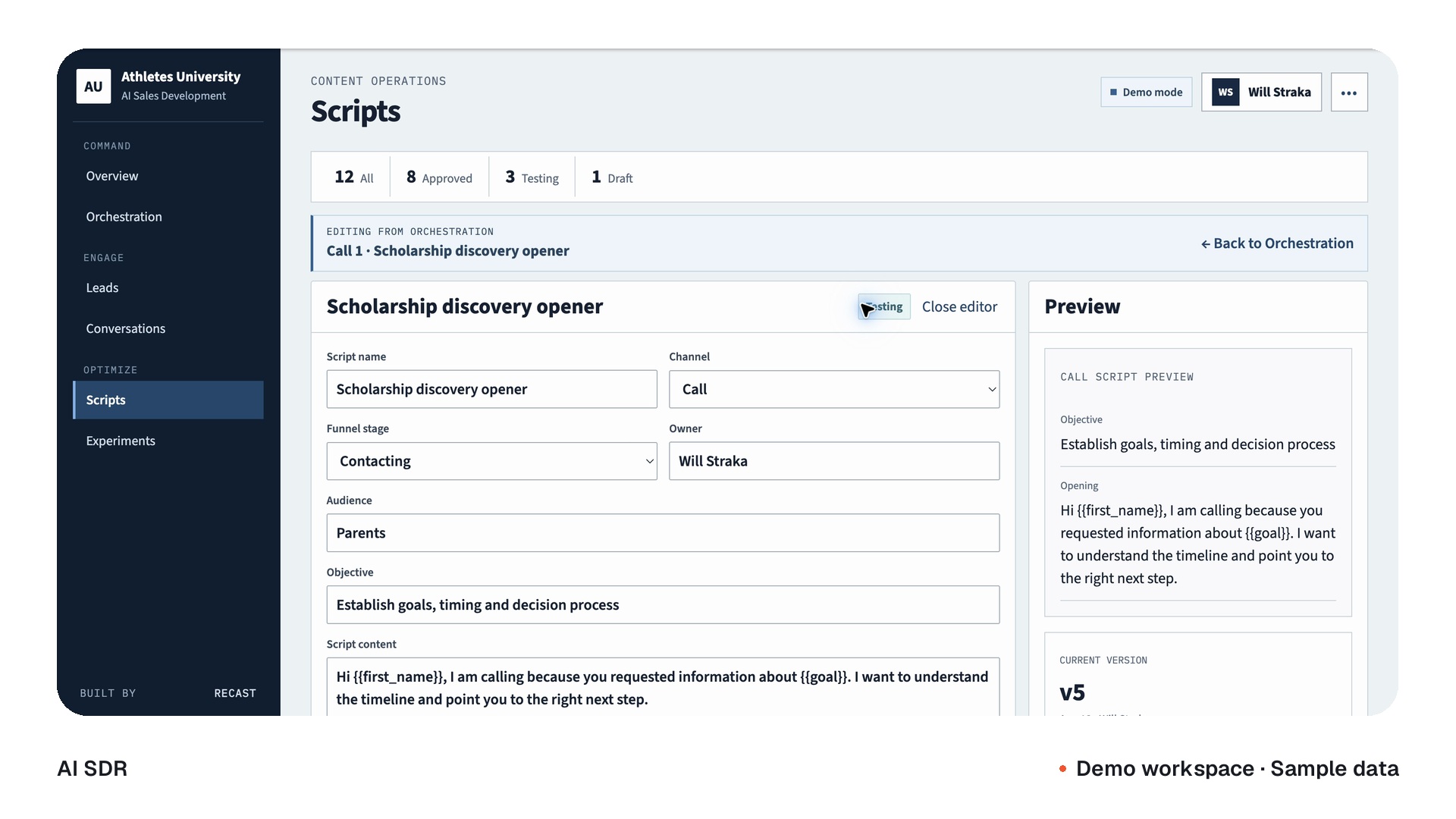
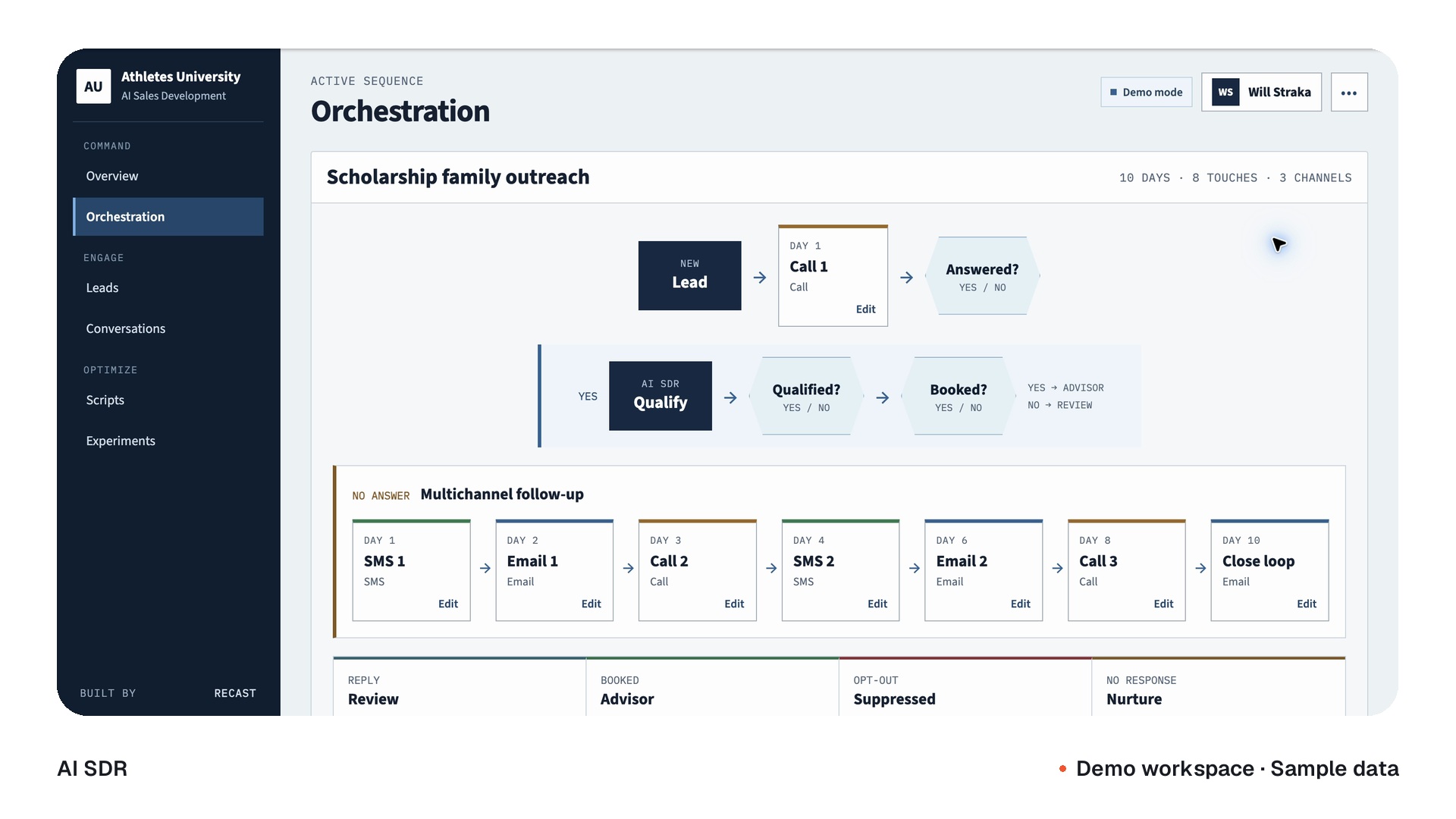
The AI SDR demo sequence, qualification branches and script workspace.
From first touch to the next stepDemo workspace · Sample data
Inside your calling operation
The voice of the system

Don’t imagine the call.
Listen to it.

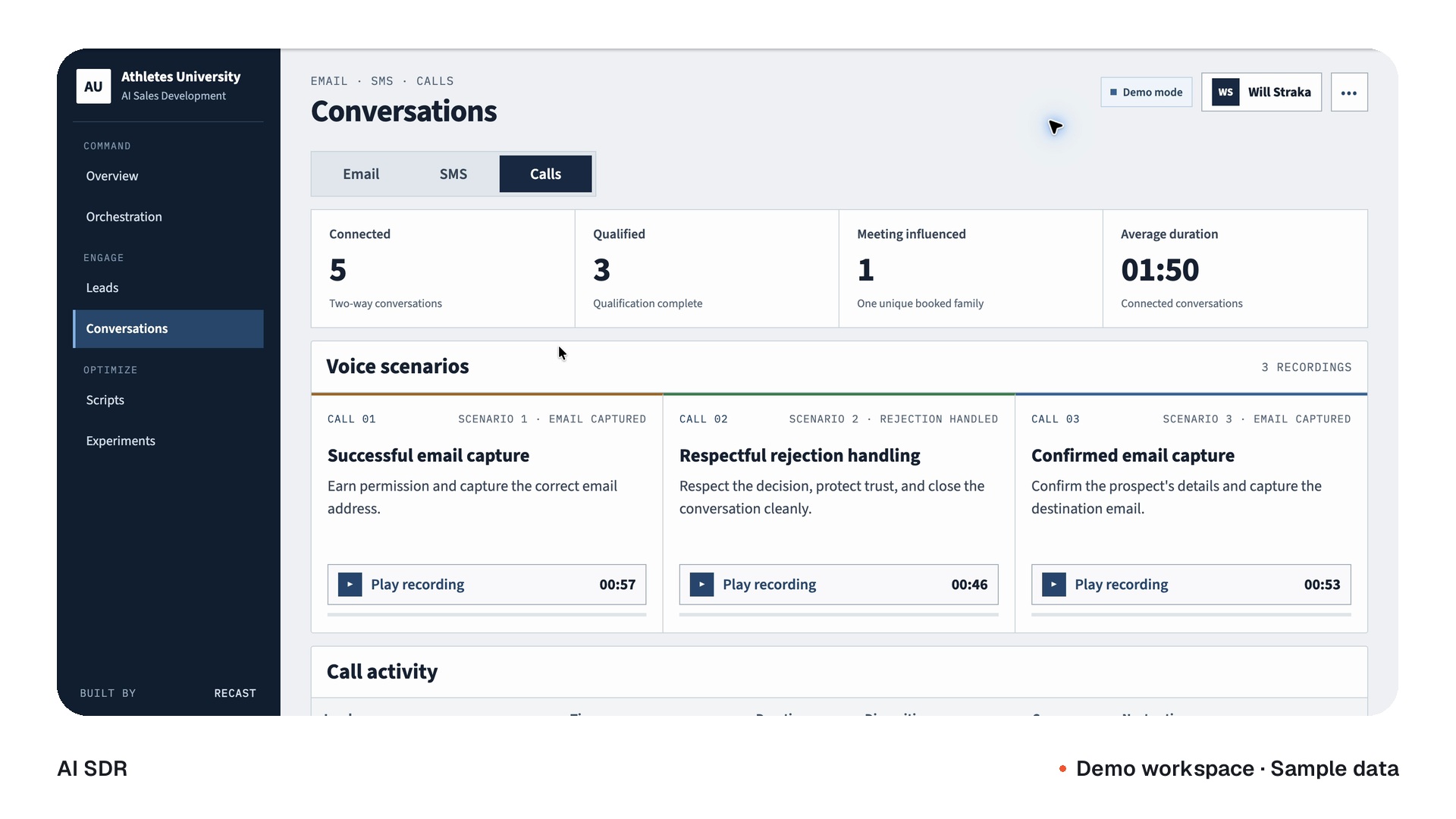
A useful conversation has a purpose: ask clearly, listen to the answer and handle the next step. Hear examples from our calling demo.

Listen closely.
Powered by ElevenLabs

Capture the right email.

The caller requests a practice contact, repeats the email and confirms how to address the follow-up.

0:00 / 0:57
Caller examples from our demo · Contact details removed
Read the transcript +

0:00 · RecipientHello, this is [name and clinic removed].

0:03 · CallerOh, hi. Good morning, [name removed]. It’s Clara from Care Networks.

0:06 · CallerI was just wondering if I could grab your practice manager’s email to send through some info on a doctor, or whoever deals with the hiring for your GPs.

0:16 · RecipientYeah, sure. You can just send it to reception.

0:20 · CallerNo worries. What’s the best email there?

0:25 · RecipientIt’s [email address removed].

0:29 · CallerPerfect. So that’s [email address removed].

0:33 · RecipientYeah, that’s the one.

0:38 · CallerAnd who should I address that to?

0:40 · RecipientJust address it to reception. We’ll forward it on.

0:45 · CallerNo worries. I’ll do that. Perfect. I’ll send that through. Thanks so much. Have a good day.

0:51 · RecipientYou too.

0:55 · SpeakerBye.

The voice starts the conversation.
The system carries it forward.

Your lead source, calling rules and next actions, connected around one conversation.

The starting point

A new enquiry.
Or an agreed follow-up.

From the lead source or list included in your workflow.

Lead contextContact record
The conversation brief

Your script. Your standards.

  • Approved questions
  • Qualification criteria
  • Handoff & stop rules
recast / AI SDR

The calling workflow.

Orchestrated around your business.

Queue & calling windowsQualification & routingOutcomes & record updates
ElevenLabsConversational voice
Phone connectionYour configured telephony provider

Human handoff

The agreed team route and fallback.

Calendar booking

When the connection is in scope.

The CRM record

The actual outcome, fields and notes.

No answerCheck the window and attempt limit before any retry.

Stop or completeRecord the outcome. End further attempts.

Illustrative workflow. Calling rules, providers and record destinations are configured for your deployment. ElevenLabs powers the voice; telephony provides the phone connection.
The operation behind the voice

See the conversation.
See what comes next.

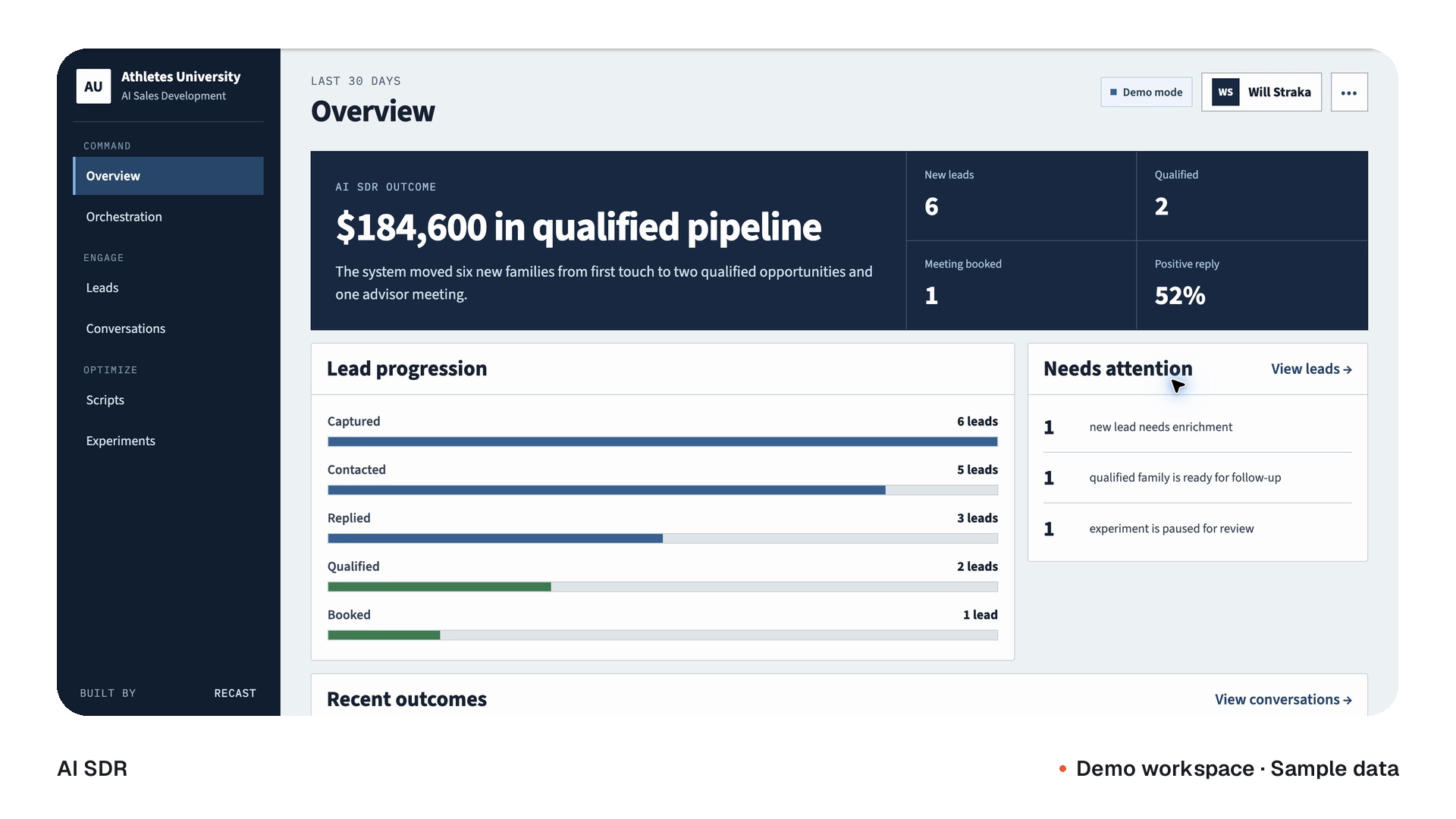
Calls, context, outcomes and follow-up, brought into one view. A workspace shaped around the decisions your team needs to make.

A tour of the sample pipeline, lead progression and recent outcomes.
The AI SDR workspaceDemo workspace · Sample data

One example of a configured workspace. Your interface, channels and integrations are defined around your scope.

Before the first word

A lead is more
than a number.

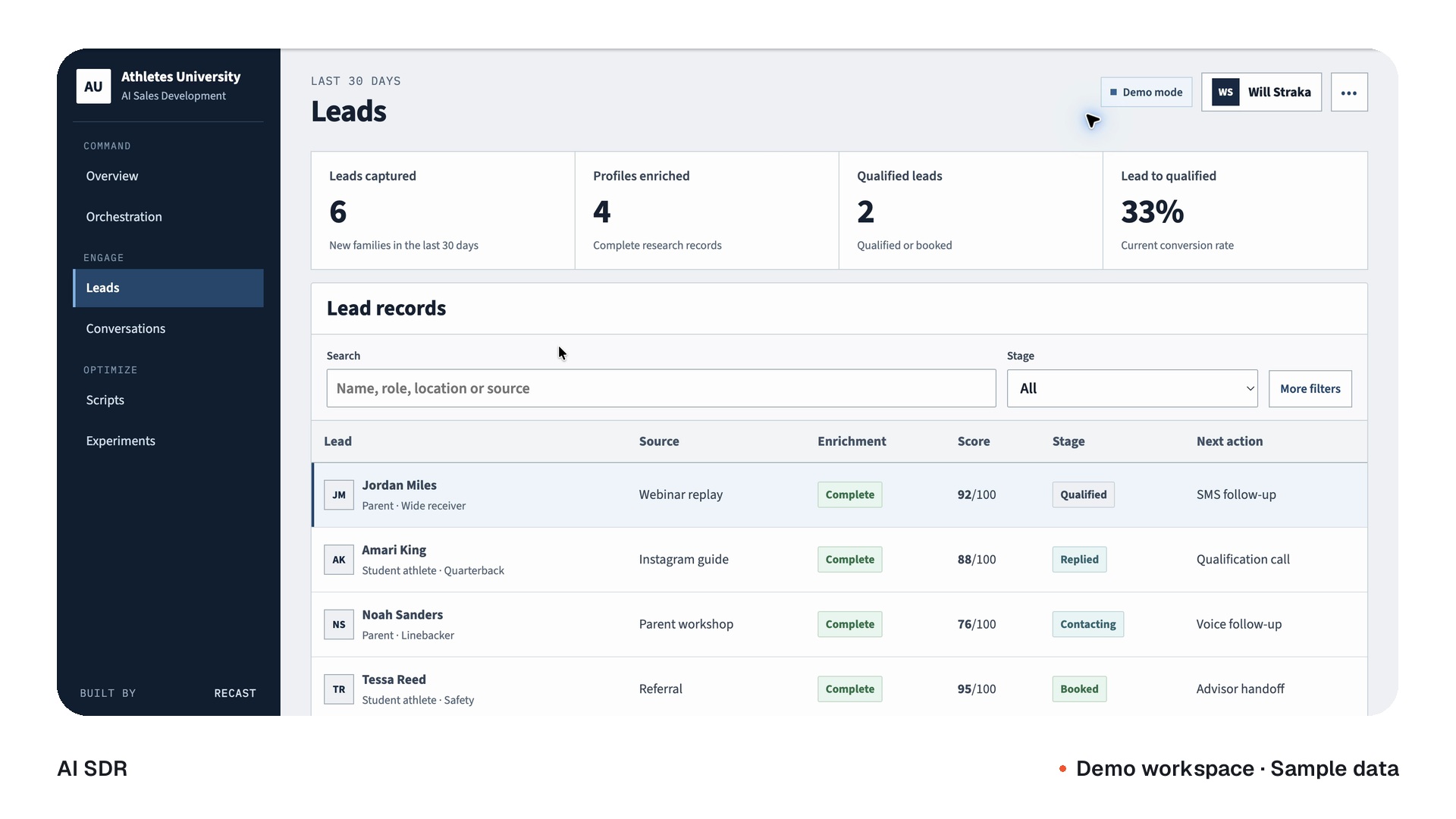
The enquiry, its source and the information already captured give the caller a useful starting point. Qualification turns the conversation into something your team can act on.

Source → Context → Qualification

The right questions begin with the right information.

The demo lead workspace, qualification fields and contact context.
From a lead to a useful handoffDemo workspace · Sample data

Every outcome
has a next step.

A conversation is only useful when the system knows what should happen after it.

The trigger

A new enquiry reaches your CRM.

  1. Check the lead

    Apply the agreed eligibility, calling hours and attempt rules.

  2. Start the conversation

    The ElevenLabs-powered caller follows your approved questions.

  3. Choose the next step

    Route the response using your qualification and handoff rules.

  4. Keep the context

    Write the actual outcome, agreed fields and notes to the contact record.

Illustrative contact record

A conversation your team can continue.

Qualification captured
Disposition
The actual call outcome
Qualification
Agreed answers and fields
Next action
Follow the configured route

Booking is an available route when the calendar connection is included and tested.

Illustrative scenarios. Scripts, transfer routes, retry limits and calendar connections are configured and tested where included.

Voice examples, recorded dispositions and the next action in the demo workspace.
The record follows the conversationDemo workspace · Sample data
After the conversation

A clear outcome.
A useful handoff.

Capture the response, update the record and route the next step. Qualified conversations can move to your team; unanswered calls follow the agreed retry rules.

Your team stays in the loop.

Human transfer, review and stop conditions are part of the workflow.

The work behind the voice

Inside real businesses.

Explore our work
Haroon KamalHaroon Kamal
Linda’s Care
Working voice bridge

The call, the qualification and the handoff.

An ElevenLabs-powered calling bridge connects lead qualification, retries and warm transfers to GoHighLevel.

RECAST technical check · May 30, 2026
Jane BenjaminJane Benjamin
Care Networks
Prepared pilot

A recruitment caller, prepared for a controlled pilot.

A clinic-outreach voice agent with an agreed conversation structure, data fields and dry-run controls.

Launch gates pending · Client & distribution partner
More of the RECAST network

The same team.
A wider body of work.

Clients across our AI, engineering and growth work.

Scaling WebinarsConvertSailWhite Wolf NutritionZ MediaThunder ComputeBlackFly Media
Athletes UniversityLEED AgencyPlutifyWerkstatt LichtenthalAdlicioTradesCove
Built by our in-house team

Your process.
Properly connected.

We build the conversation and the system around it. The lead trigger, phone connection, script and destination all have a job to do.

  1. 01

    Define the conversation.

    Agree the objective, voice, questions and what a useful outcome looks like.

  2. 02

    Connect the workflow.

    Bring together the lead source, calling provider and the CRM or calendar in scope.

  3. 03

    Test the whole journey.

    Work through representative calls, missed connections, transfers and stop conditions.

  4. 04

    Put your team in control.

    Hand over the workflow, operating guidance and the agreed path for support.

Meet the team building it
A few good questions

Before we
get talking.

What does the caller do?

It handles the conversation steps we agree: intake, qualification, follow-up and the next action. Your script defines what it can say and when it should hand over to a person.

Does it use ElevenLabs?

Yes. ElevenLabs powers the conversational voice layer. RECAST builds the calling workflow around your lead sources, telephony, qualification rules and record destinations.

Can it book meetings or transfer calls?

Warm transfers are part of our documented calling work. Booking can be included when we scope and test the calendar connection, availability rules and confirmation flow.

Can it connect to our CRM?

We scope the connection around your CRM’s available API and permissions. GoHighLevel is part of the documented Linda’s Care deployment; other destinations are confirmed for your build.

What happens when nobody answers?

Retry windows, business hours, maximum attempts and stop conditions are configured for the workflow. A missed call follows that queue; it does not trigger unlimited redialing.

What is included in a deployment?

Your call flow, voice configuration, integrations and operating guidance are scoped together. The interface is shaped around what your team needs; the demo shows one possible workspace. Provider usage, support and ongoing operation are defined in your agreement.

Let’s build your next step

What should happen
after your next lead comes in?

Let’s build the calling workflow around that answer.

Talk through your workflow